Lumail vs Ortto: Which Email Platform Fits How You Work?
Ortto bills by contact count for a CDP, journeys, SMS, and live chat. Lumail bills by emails sent, stores unlimited subscribers, and lets agents run it.
In this guide
Ortto is a marketing automation suite that combines a customer data platform, journeys, SMS, push, and a support inbox, priced by contact count; Lumail is an email platform priced by emails sent, built so AI agents and developers can operate it. Both run campaigns and visual automations. Ortto's center is marketing plus customer data plus support in one vendor. Lumail's is the email system itself.
The question is whether you want a broad suite billed on your audience size or a focused email system billed on what you send. Ortto's Starter plan is $237/month billed annually at 10,000 contacts, which tells you who it is built for. Ortto facts here come from its official pricing page as of August 2026; plans change, so check before you buy. For the compact version, see the side-by-side comparison table.
Lumail vs Ortto at a glance
| Decision | Lumail | Ortto |
|---|---|---|
| Core focus | Campaigns, workflows, transactional email, and AI agents | Customer data platform with journeys, SMS, push, and live chat |
| Pricing basis | Emails sent; unlimited subscribers on every plan | Contact count, with a separate monthly email limit |
| Free plan | 3,000 emails per month, no credit card | None; 14-day trial with 100 email sends |
| Paid entry | Premium at $20/month with 40,000 emails | Starter at $237/month billed annually for 10,000 contacts |
| AI and developer access | 89 MCP tools, CLI, TypeScript SDK, REST API | In-app AI, MCP server focused on reports, REST API |
| Automation | Graph workflows on every plan | Visual journeys across email, SMS, and push |
| Transactional email | Built in through the API or SMTP | Professional plan and up, with support approval; no SMTP |
| Best fit | Teams running email through agents, code, and a visual app | Teams wanting marketing, customer data, and support in one |
Lumail's current plans are on the Lumail pricing page.
Choose Lumail if AI agents should operate your email
Ortto launched a remote MCP server in November 2025 that works with Claude, ChatGPT, and other clients. Its roughly 20 tools mostly read campaigns, contacts, and reports, and edit email assets and knowledge-base articles; none send email or edit journeys. It also has a REST API and in-app AI for subject lines, filters, and support replies, but no CLI or TypeScript SDK.
Lumail exposes 89 organization-scoped MCP tools covering campaigns, subscribers, tags, segments, workflows, templates, analytics, and transactional sending. The same operations run in ChatGPT, Claude, Claude Code, and Cursor, and through a CLI, a TypeScript SDK, and a REST API. An agent works on your real audience and real workflow state.
In practice you can ask an assistant to:
- draft next week's campaign from an approved brief and template;
- build or edit a workflow graph, not only read its report;
- tag and segment subscribers before a targeted send;
- send a receipt or password reset from the same account;
- summarize last month's results without exporting a CSV.
You keep consequential actions behind human approval and finish drafts in the visual editor.
Choose Lumail if you store a large list and email it selectively, if you need transactional email on every plan without an approval step, or if you want agents to operate the account rather than report on it.
Choose Ortto if you want marketing, data, and support in one vendor
Ortto packs a lot into one product. Its customer data platform feeds journeys across email, SMS, and push, and its Talk module adds a support inbox, live chat, and a knowledge base alongside the marketing.
Choose Ortto if:
- you want a customer data platform plus omnichannel journeys and a live-chat inbox from one vendor;
- you need landing pages, lead scoring, dedicated IPs, and transactional email and SMS as a packaged tier;
- your marketers prefer AI built into a contact database over an agent-operated email system.
Lumail does not try to be a customer data platform or a helpdesk. It has no SMS, push, or live chat. Its focus is the email system: audiences, campaigns, graph workflows, transactional delivery, and the programmable surface around them.
Compare the pricing models, not the starting prices
Ortto prices by how many contacts you store, with monthly email volume as a separate limit you adjust at checkout. At 10,000 contacts, Starter is $237/month and Professional is $509/month, both billed annually; Enterprise is custom. Paying quarterly saves 10% and annually 15%. Email beyond your limit costs $1 per 1,000. SMS numbers and credits are add-ons.
Lumail prices by emails sent, with unlimited subscriber storage on every plan:
- Free: 3,000 emails per month, no credit card;
- Premium: $20/month with 40,000 emails included, then $0.60 per 1,000;
- Business: $200/month with 400,000 emails included, then $0.40 per 1,000.
A worked example
Say you have 10,000 subscribers and send a weekly newsletter to all of them. That is about 40,000 emails a month.
On Lumail, that is Premium: $20 for the included 40,000 emails, so $20 a month, or $240 a year.
On Ortto, 10,000 contacts puts you on Starter at $237 a month billed annually, or $2,844 a year, before any SMS. That buys more than email, including a customer data platform and journeys across channels, but if email is what you use, most of that spend goes to features you leave idle.
Contact-based pricing charges you for the size of your audience; send-based pricing charges you for contacting it. A large list you email selectively favors Lumail. A team that uses Ortto's data, SMS, and support tools may get its money's worth.
Compare automation and transactional email
Ortto's journey builder on Starter handles email, SMS, and push with delays, conditions, filters, and percentage splits, and journeys can start or end on customer data events. Playbooks cover simpler email cadences. Professional adds dynamic content, landing pages, lead scoring, and webhooks.
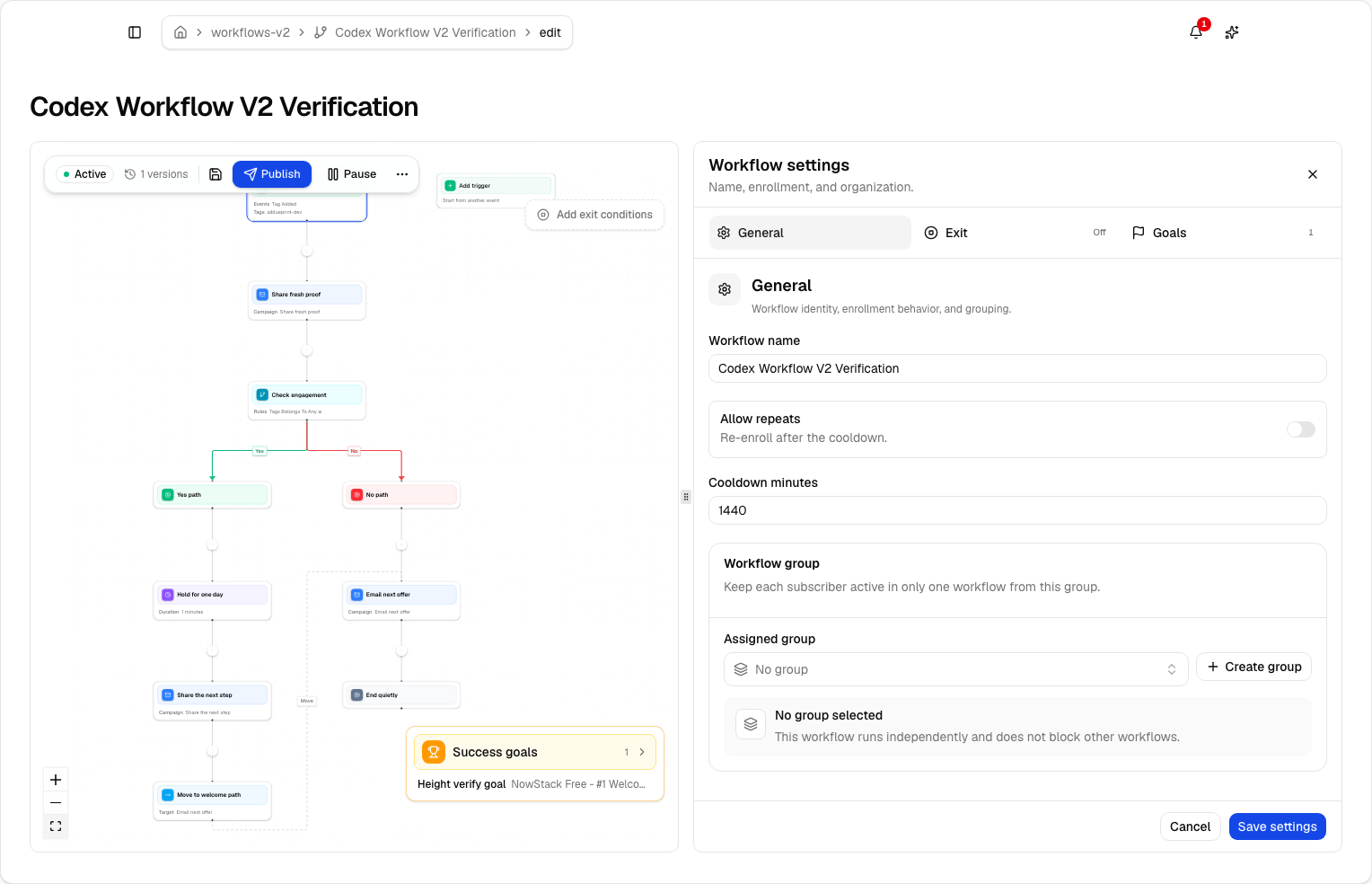
Lumail's workflow engine is graph-based and included on every plan, including Free. It supports subscriber, tag, event, schedule, and manual triggers; email, wait, action, and webhook steps; condition and weighted branches; and goals and exit rules. Webhook steps are available on every plan, and the same graph is readable and editable from the app, MCP, CLI, SDK, and API.
Transactional email is the sharper split. On Ortto, it starts on the Professional plan, and support must approve the feature before you mark messages as transactional or send them through the API. There is no SMTP relay. Lumail sends transactional messages from the same organization on every plan, through the API or SMTP relay at smtp.lumail.io:587 with STARTTLS.
Migrating from Ortto to Lumail
Move the email program first and keep other channels until you decide their future.
- Export people and subscription status. Export contacts with their email permission and unsubscribes. Import suppressions as well as actives.
- Authenticate your sending domain. Configure SPF and DKIM in Lumail and verify the domain. Keep Ortto live while DNS propagates.
- Rebuild one journey as a workflow. Recreate the email steps of your main journey as a graph workflow, then test every branch with test subscribers.
- Move transactional email. Point receipts and account email at the Lumail API or SMTP relay, and confirm delivery before switching off Ortto's transactional sends.
- Decide what stays. SMS, push, the Talk inbox, and customer data streams have no Lumail equivalent. Keep them elsewhere or retire them.
Frequently asked questions
Is Lumail an Ortto alternative?
Yes, for campaigns, automations, transactional email, and agent access. If you need a customer data platform, SMS, push, live chat, or landing pages in one product, Ortto remains the better fit.
Is Lumail cheaper than Ortto?
Usually, for email. 10,000 subscribers mailed weekly is $20/month on Lumail, while Ortto Starter at 10,000 contacts is $237/month billed annually, though it includes more than email.
What is the main difference between Lumail and Ortto?
Ortto is a customer data and omnichannel marketing suite billed by contacts. Lumail is an email platform billed by volume, with graph workflows, built-in transactional email, and 89 MCP tools agents can operate.
Can I migrate from Ortto to Lumail?
Yes. Export contacts and suppressions, authenticate your domain, rebuild one journey as a graph workflow, and move transactional email to the API or SMTP. SMS, push, and Talk do not carry over.
Which one should you choose?
Choose Ortto if you want one vendor for customer data, omnichannel journeys, and support, and you are comfortable paying by contact count for that breadth.
Choose Lumail if email is a system you operate: agents working through 89 MCP tools, graph workflows on every plan, transactional email in the same account, and a bill that follows what you send rather than how many contacts you store.
You can start Lumail free with 3,000 emails per month and no credit card, review the pricing plans, or browse the full comparison hub.