ClickFunnels Integration
Automatically sync contacts, tags, and order events from ClickFunnels to Lumail using webhooks
Automatically sync contacts, tags, and order events from ClickFunnels to Lumail using webhooks. This integration allows you to centralize your email marketing data and leverage Lumail's advanced segmentation and automation features with your ClickFunnels audience.
What is ClickFunnels?
ClickFunnels is a comprehensive sales funnel builder that helps businesses create marketing funnels, landing pages, and manage online sales. With this integration, you can sync your ClickFunnels contacts, tags, and order activity to Lumail in real-time.
How It Works
When events occur in ClickFunnels (new contacts, tag changes, orders), ClickFunnels sends webhook notifications to Lumail. The integration:
- Receives webhook events from ClickFunnels
- Processes the event (creates/updates subscribers, syncs tags, tracks orders)
- Updates your Lumail database in real-time
- Records all events in the subscriber timeline
Guided setup (recommended)
Lumail has a step-by-step wizard that generates the token and the webhook URL for you:
Settings -> Integrations -> ClickFunnels, at https://lumail.io/orgs/<your-org-slug>/settings/integrations/clickfunnels.
It gives you the exact values to paste into ClickFunnels. The manual steps below do the same thing by hand.
Setup Instructions
Follow these steps to connect your ClickFunnels account to Lumail.
These steps are for ClickFunnels 2.0 (workspace webhooks). On ClickFunnels Classic (1.0), webhooks are configured per funnel and use a different URL - see ClickFunnels Classic (1.0).
Step 1: Generate Your API Token
First, you need to generate an API token for the integration.
- Visit your organization settings page
- Click "Generate Token" and give it a name like "ClickFunnels"
- Copy the generated token - you'll need it for the webhook URL
Step 2: Configure the Webhook in ClickFunnels
Now you'll add the webhook endpoint in your ClickFunnels workspace.
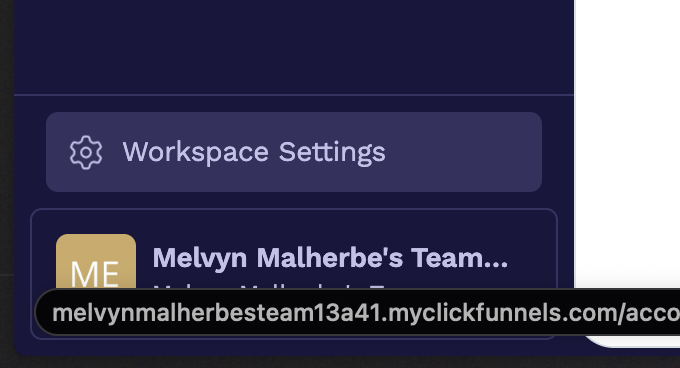
On the bottom left corner, click on workspace settings:
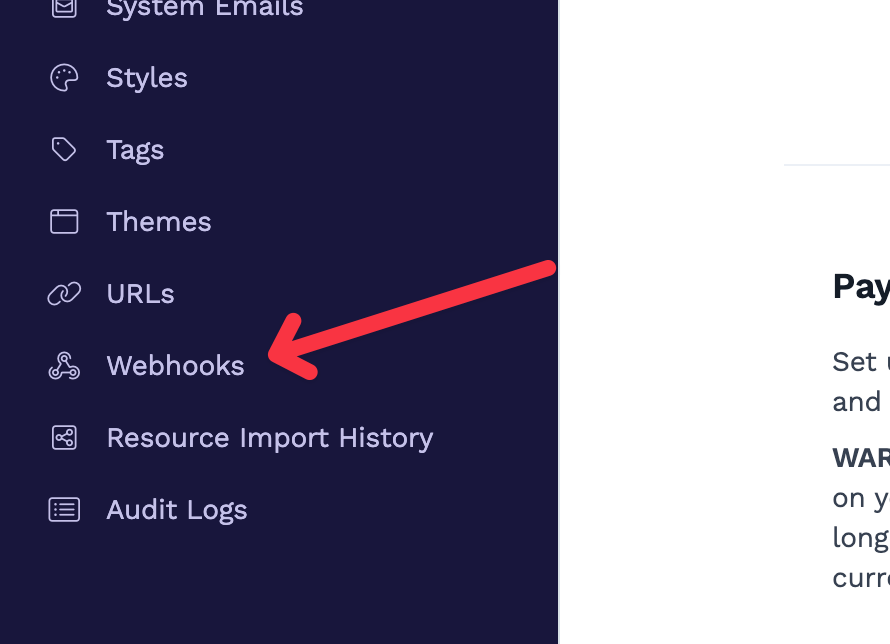
Then navigate to the "Webhooks" settings page:
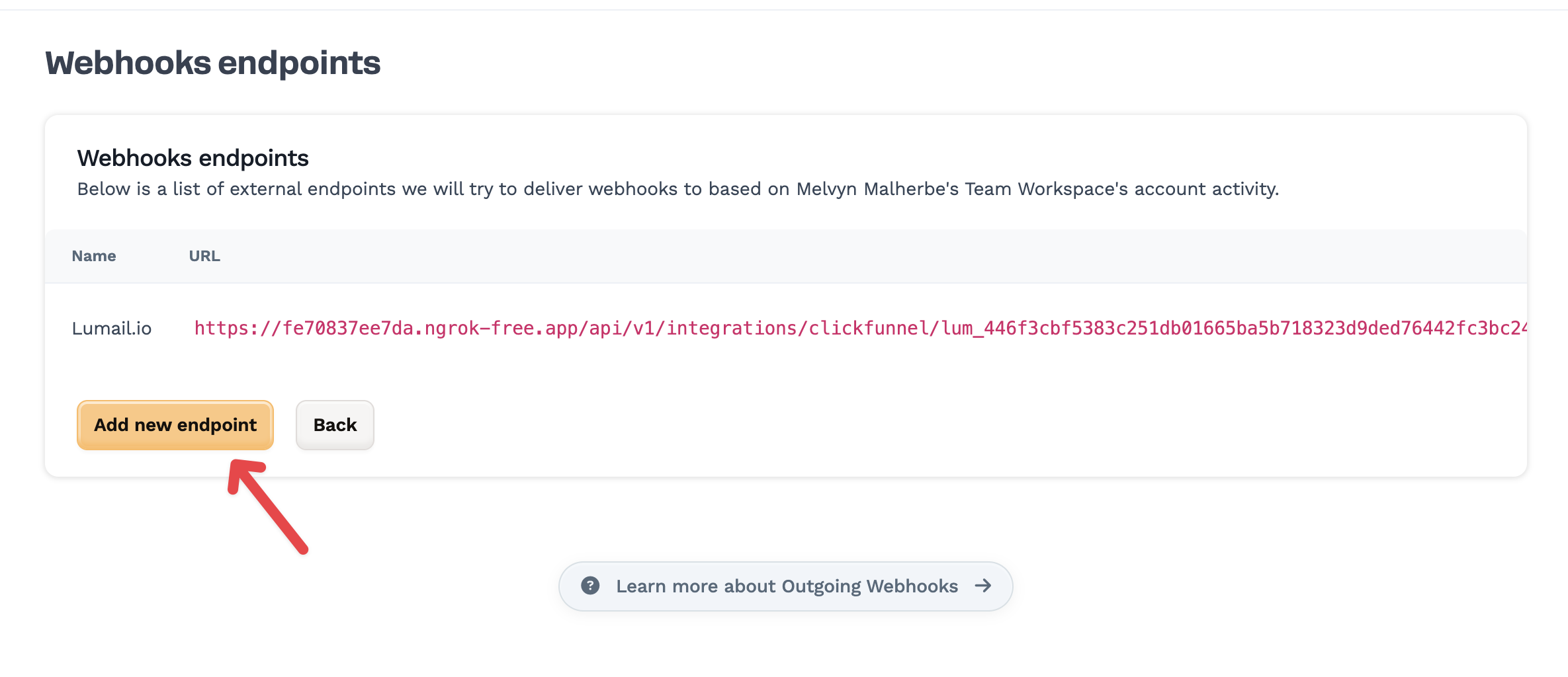
You will be redirected to the webhooks endpoint page. Click on "Add new webhook" button:
In the webhook form, fill in the following details:
- Name:
Lumail.io - URL:
https://lumail.io/api/v1/integrations/clickfunnel/{your-token}- Replace
{your-token}with the API token you generated in Step 1, including itslum_prefix - Example:
https://lumail.io/api/v1/integrations/clickfunnel/lum_1a2b3c...
- Replace
- Event types: Select the events you want to sync:
- ✅ contact.created - Syncs new contacts
- ✅ contact.updated - Upserts existing contacts and tags
- ✅ contact.identified - Syncs contacts identified from a form
- ✅ contact.deleted - Unsubscribes contacts without deleting history
- ✅ contact.unsubscribed - Marks contacts as unsubscribed
- ✅ orders/invoice.fulfilled - Tracks successful orders
- ✅ orders/invoice.refunded - Tracks refunded orders
- Endpoint scope: Leave empty
- Name:
Click "Create endpoint" and your integration will be ready
Step 3: Test the Integration
To verify the integration is working:
- Add a test contact in ClickFunnels with some tags
- Check your Lumail organization's subscribers list
- The contact should appear with all synced tags
- Check the subscriber's timeline to see the webhook events
ClickFunnels Classic (1.0)
ClickFunnels Classic has no workspace webhook settings, and its webhooks send a different payload than ClickFunnels 2.0. Use the dedicated Classic URL instead of the 2.0 one: it converts Classic webhooks to the format Lumail expects.
Step 1: Generate your API token
Generate a token exactly as in Step 1 above (or reuse your ClickFunnels token).
Step 2: Add the webhook to each funnel
Classic webhooks live in each funnel's settings, not in your account settings:
- Open the funnel in ClickFunnels Classic
- Go to the Settings tab of the funnel
- Scroll to the bottom and click Webhooks (Manage your funnel webhooks)
- Click New Webhook and fill in:
- URL:
https://clickfunnel-v1.lumail.io/{your-token}- Replace
{your-token}with your API token, including itslum_prefix - Example:
https://clickfunnel-v1.lumail.io/lum_1a2b3c... - Optional: add tags after the token to tag every subscriber this funnel sends, for example
https://clickfunnel-v1.lumail.io/lum_1a2b3c.../my-course(separate several tags with commas, write spaces as%20:.../client%20Magic%20Love)
- Replace
- Event:
contact_created - Version:
1 - Adapter:
json
- URL:
- Save, then add a second webhook with the same URL for the
purchase_createdevent (and a third forpurchase_updatedif you want refunds to sync)
Repeat for every funnel you want to sync. One event per webhook avoids duplicate deliveries.
Do not paste the ClickFunnels 2.0 URL (
https://lumail.io/api/v1/integrations/clickfunnel/...) in a Classic funnel: Classic payloads have noevent_typeand Lumail rejects them.
What syncs from Classic
| Classic event | Lumail behavior |
|---|---|
contact_created | Creates or updates the subscriber (email, name, phone) |
| Contact with an unsubscribe date | Marks the subscriber as unsubscribed (never resubscribes them) |
purchase_created / purchase_updated with status paid | Same as Invoice Fulfilled: upserts the buyer and adds the invoice-fulfilled tag |
purchase_updated with status refunded | Same as Invoice Refunded: adds the invoice-refunded tag |
| Purchase with another status (failed, pending) | Upserts the buyer as a contact, without an invoice tag |
Classic contacts have no tags, so no ClickFunnels tags are synced: add tags after the token in the URL to tag subscribers per funnel. Tags are added, never removed. On purchase webhooks, these tags are applied only to paid purchases (never to failed, pending or refunded ones). To tag customers only, add the tags to the purchase webhook URLs and not on contact_created, which also fires for leads who never pay. Webhooks without an email address are acknowledged and ignored.
Supported Events
The ClickFunnels integration automatically syncs the following events:
Contact Created (contact.created)
When a new contact is created in ClickFunnels:
- Creates or updates the subscriber in Lumail
- Syncs all contact fields (first name, last name, phone)
- Applies all tags from ClickFunnels
- Records the event in the subscriber timeline
Data synced:
- Email address
- First name and last name (combined into full name)
- Phone number
- All contact tags
Contact Updated (contact.updated)
When a contact is updated in ClickFunnels:
- Creates or updates the subscriber in Lumail
- Syncs name, phone, and tags
- Records the event in the subscriber timeline
Contact Identified (contact.identified)
When a visitor is identified by email (typically after submitting a form):
- Creates or updates the subscriber in Lumail
- Syncs name, phone, and tags
- Records the event in the subscriber timeline
ClickFunnels often emits
contact.updatedandcontact.identifiedmore thancontact.created. Lumail treats those as upserts so form opt-ins still land in your list.
Contact Deleted (contact.deleted)
When a contact is deleted from ClickFunnels:
- Marks the subscriber as unsubscribed in Lumail
- Keeps the subscriber row and send history
- Records the event in the subscriber timeline
Contact Unsubscribed (contact.unsubscribed)
When a contact unsubscribes in ClickFunnels:
- Marks the subscriber as unsubscribed in Lumail
- Preserves subscriber data for compliance
- Records the event in the subscriber timeline
Invoice Fulfilled (orders/invoice.fulfilled)
When an order is successfully completed:
- Creates or updates the subscriber with contact information
- Adds the tag "invoice-fulfilled"
- Records the event in the subscriber timeline
Data synced:
- Email, first name, last name, phone from invoice contact
- The
invoice-fulfilledtag
The invoice amount, currency and ID are not stored on the subscriber. Segment on the
invoice-fulfilledtag, and use the Events API if you need the amount in revenue tracking.
Invoice Refunded (orders/invoice.refunded)
When an order is refunded:
- Creates or updates the subscriber with contact information
- Adds the tag "invoice-refunded"
- Records the event in the subscriber timeline
Data synced:
- Email, first name, last name, phone from invoice contact
- The
invoice-refundedtag
As with fulfilled invoices, the amount and currency are not stored on the subscriber. The
invoice-fulfilledtag is not removed on a refund - a refunded subscriber carries both tags.
Troubleshooting
Webhook not working?
- Check the webhook URL: Make sure you replaced
{your-token}with your actual API token - Verify the token: Ensure you copied the complete token without extra spaces
- Check webhook events: Make sure you subscribed to the correct events in ClickFunnels
- Review logs: Check your subscriber timeline for any error messages
Contacts not syncing?
- Verify the webhook is active in ClickFunnels
- Check that the contact has a valid email address
- Ensure the webhook URL is correctly formatted
- Test with a new contact creation to trigger the webhook
Tags not appearing?
- Tags are automatically created in Lumail if they don't exist
- Check the subscriber's tags section to see all synced tags
- Review the subscriber timeline for tag sync events
- For order events, check for "invoice-fulfilled" and "invoice-refunded" tags
ClickFunnels Classic webhook not working?
- Make sure the URL starts with
https://clickfunnel-v1.lumail.io/, nothttps://lumail.io/api/... - Check the webhook was added on the funnel that actually received the opt-in or purchase
- Pick the
jsonadapter and version1
Order events not tracking?
- Make sure you selected the order event types (orders/invoice.fulfilled, orders/invoice.refunded) in the webhook configuration
- Verify that order webhooks are enabled in your ClickFunnels workspace
- Check the subscriber timeline for order-related events
Related Documentation
- ClickFunnels Webhooks Documentation
- Lumail API Reference - Complete API documentation
- API Tokens - Create and manage API tokens
- Tags API - Manage synced tags
- Subscriber Events - View integration events in timeline
- Revenue Tracking - Record order amounts yourself with the Events API