Bot vs Human Opens
How Lumail classifies opens and clicks as human, bot, or not evaluated, and where this appears in your metrics
A growing share of email "opens" are not people. Apple Mail Privacy Protection prefetches images, Gmail proxies them, and corporate security gateways scan every link before the recipient ever sees the message. Lumail classifies each open and click so you can tell real engagement from automated noise.
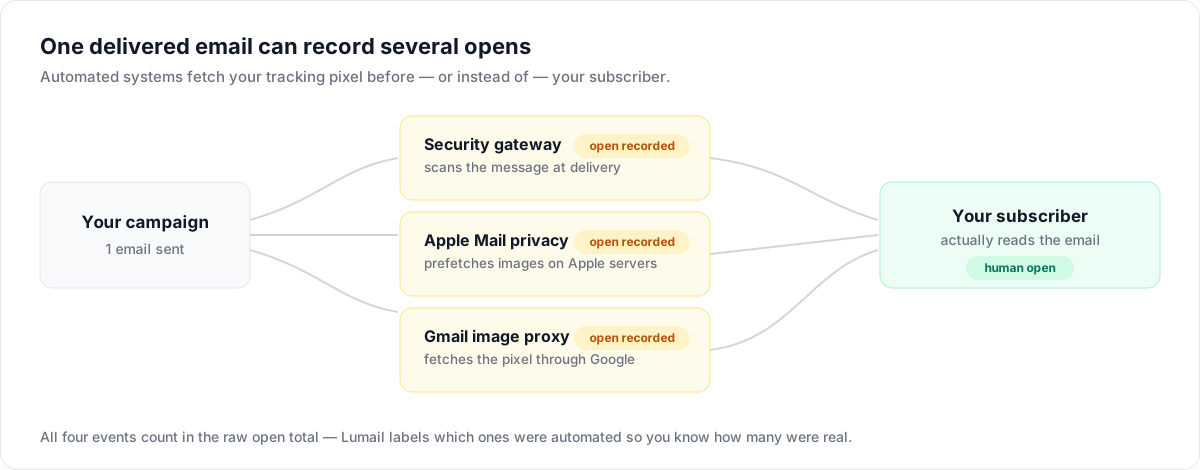
What gets classified
Every tracked open and click is evaluated at the moment it is recorded:
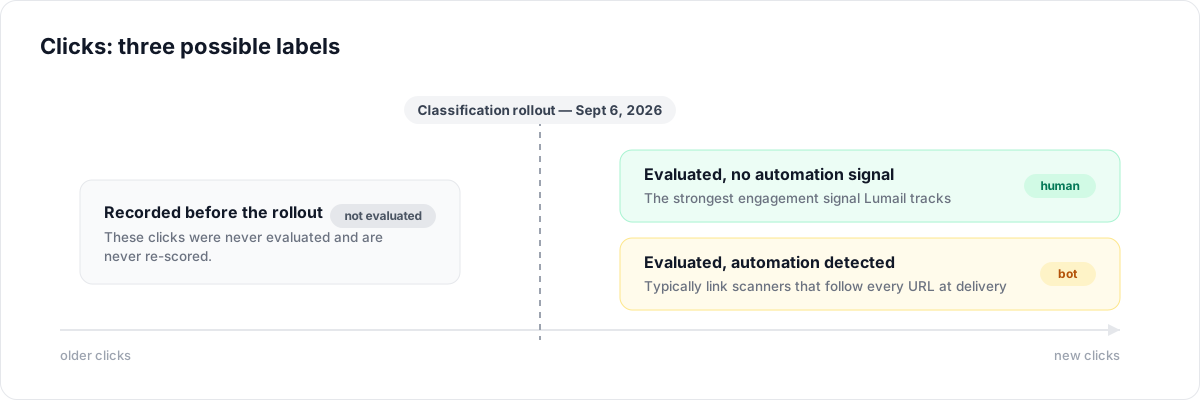
- Human: the event was evaluated and showed no automation signal.
- Bot: the event matched one of the detection rules below.
- Not evaluated (clicks only): the click was recorded before click classification rolled out on September 6, 2026. Historical clicks are never re-evaluated.
Classification is informational: it never changes your unique open and click counts, your open rate, click rate, or engagement score. A bot open still counts as an open. Instead, Lumail shows you alongside those numbers how much of them you can trust.
Detection reasons
When an open or click is flagged as automated, Lumail records why:
| Reason | What it means |
|---|---|
| Apple Mail | Apple Mail Privacy Protection prefetched the tracking pixel on Apple's servers, whether or not the email was read |
| Gmail Proxy | Gmail's image proxy fetched the pixel on Google's infrastructure |
| Security Scanner | An email gateway (Yahoo, Outlook, Barracuda, and similar) scanned the message before delivery to the inbox |
| Fast Open | The email was opened within 2 minutes of authenticated delivery, faster than a human realistically reads a new email |
| Bot | The same email was opened from several different browser identities, a pattern typical of impersonation bots |
| Crawler | The user agent explicitly identified itself as automation or a crawler |
Detection is best-effort. Some bots hide behind residential IPs and realistic user agents, and some fast human readers can be flagged. Treat the split as a strong signal, not an exact count.
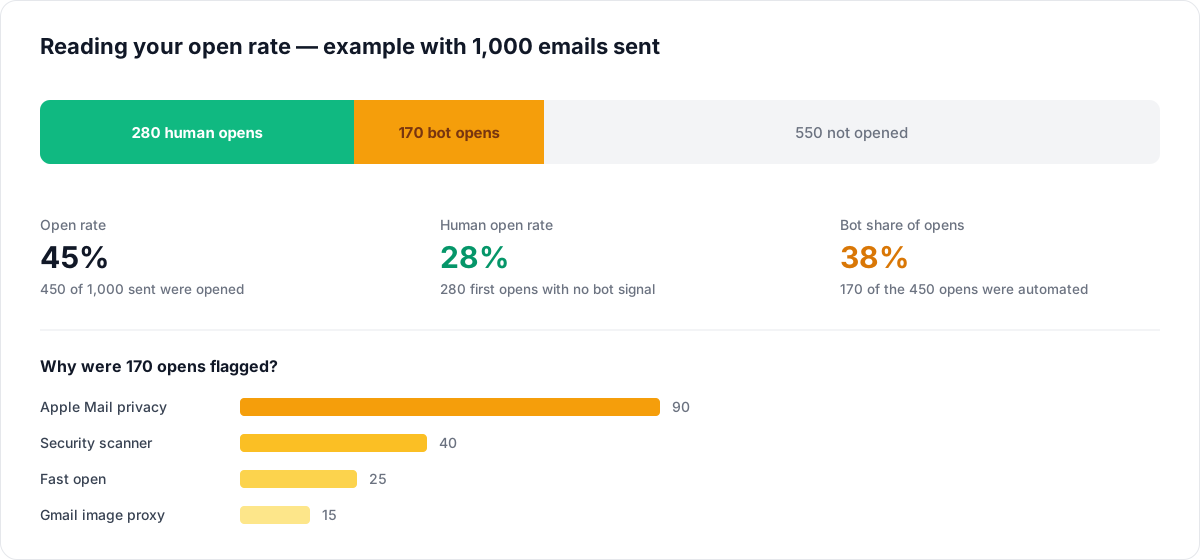
Here is how the split reads on a concrete campaign:
How "first open" is classified
Unique opens count the first interaction per email. The human/bot label describes that earliest recorded event:
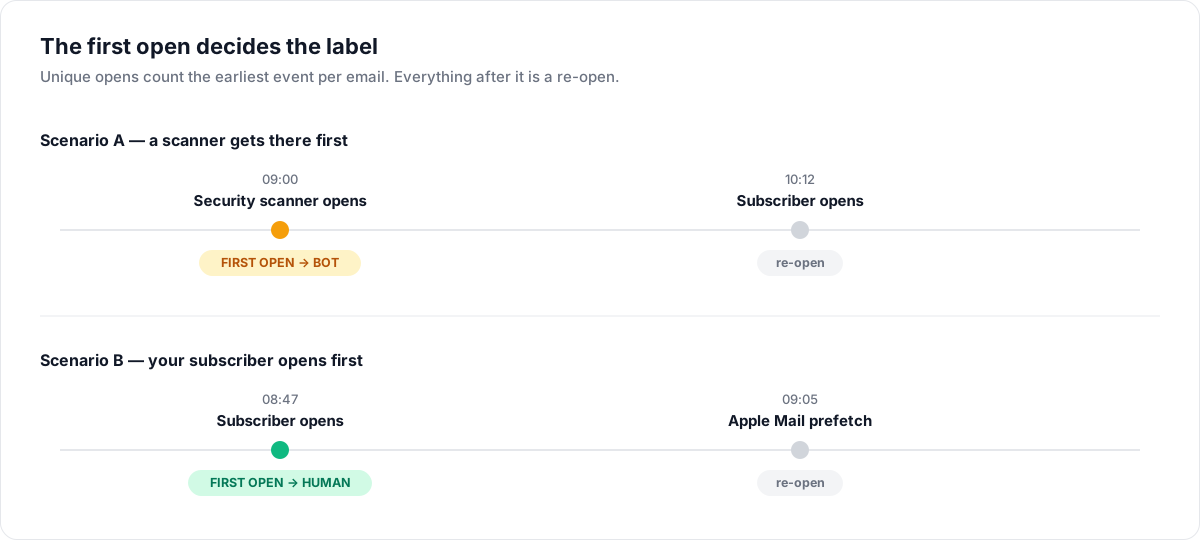
- If a security scanner opened the email first and the recipient opened it an hour later, the first open is a bot open and the recipient's open is a re-open.
- If the recipient opened first, the first open is human even if bots fetch the pixel later.
Subscriber activity follows the first human open instead. The recipient's later open still records an "Email opened" event, increments their open count, and can trigger workflow and segment conditions, even when a bot opened the email first.
This is why a list with heavy Apple Mail usage can show a high open rate but a much lower human open rate.
Where you see the split
- Campaign report: the Engagement card shows how many first opens were flagged as automated, with a badge per detection reason.
- Email detail: each email's open breakdown separates first human opens, first bot opens, and re-opens.
- Campaign Activity chart: opens and clicks over time are split into human, bot, and (for clicks) not evaluated.
- Dashboard: the Email Engagement card footer summarizes opens flagged as automated and the human / bot / not evaluated click split for the selected period.
What to do with it
- Judge campaigns on human opens and clicks. If 40% of your opens are Apple Mail prefetches, a "great" open rate may hide a flat one.
- Prefer clicks over opens for decisions. A human click is the strongest engagement signal Lumail tracks; bot clicks from link scanners are filtered out of the human count.
- Don't panic about bot opens. They are a property of your audience's email clients, not a deliverability problem. A B2B list behind corporate gateways will always show security-scanner opens.
- Watch the trend, not the absolute number. A sudden spike in bot opens with no matching sends can indicate list-quality issues or a scanner replaying old links.
Related Documentation
- Email Engagement Score - How open and click rates build your score
- Deliverability Score - Monitor sender reputation
- Subscriber Events - View open and click events in timeline